

 Home page
 Select Your Vehicle
 About Us
 Blog Posts
 Contact Us
 Reviews
 FAQ
FAQ
 Returns
 Store Policies
 Trade Account
 Tech / DIY
 Reset Procedures


How To: Subaru Power Window Reset
Subaru Power Window Reset Procedure
Lost one-touch operation after a battery disconnect? If the glass still moves when you hold the switch, a quick reset is all you need — before considering any parts replacement.
With credit to subtledriver for the original video and screenshots used in this guide.
If your Subaru's window still moves when you hold the switch but one-touch operation has stopped working, this is a window reset issue — not a motor fault. The anti-pinch system needs to relearn the window's travel limits.
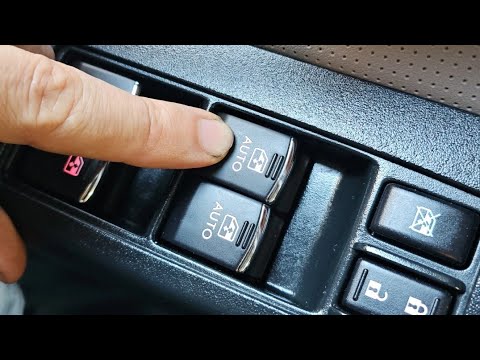
Before You Start
Check the "Initialisation of power window" section in your owner's handbook — the exact sequence varies by Subaru model and year. The steps below are based on the factory handbook procedure. Keep hands and objects clear of the glass throughout.
Close the door & turn ignition ON
Close the driver's door fully, then turn the ignition to the ON position (engine does not need to be running).
Lower the window halfway
Using the driver's window switch, lower the glass to approximately the halfway position.
Close the window completely
Pull the switch up to raise the window. Once the glass reaches the top, keep holding the switch up for approximately one second before releasing.
→ The hold-after-close step is critical — don't skip itOpen the window fully
Push the switch all the way down to fully lower the window.
Test one-touch operation
Confirm the window opens and closes normally using a single tap of the switch. One-touch should now be restored.
Still Won't Reset? The Door-Open Tip
The original demonstration video highlights leaving the driver's door open during the anti-pinch reset sequence. This differs from the closed-door factory procedure above — it is a troubleshooting tip, not a confirmed procedure for every Subaru. If the factory reset fails, verify the correct method for your specific model with a Subaru workshop or auto electrician.

If the Problem Continues
Note exactly what the window does — this helps narrow down the next steps:
| What the window does | Likely next step |
|---|---|
| Moves normally when switch held | → Retry the initialisation procedure |
| Stops, reverses or moves unevenly | → Check mechanism and control system |
| Doesn't move at all | → Investigate power supply, switch, wiring and motor |
Don't repeatedly force a sticking window or test anti-pinch protection with your fingers.
🔎 Related Guides
Direct-Fit Subaru Window Motors
We stock motors for Subaru Forester, Impreza, Liberty, Outback and more — matched to your exact vehicle.
Same-day dispatch on orders placed before 1 PM AEST.
Not sure if it's the motor or a reset issue? Call us on 0410 913 385 or visit our Contact Page — we're happy to help diagnose.
Original video and screenshots: "Subaru driver window not resetting FIX!" by subtledriver. Factory reset reference: Subaru owner's handbook, section 2-36.